OpenClaw Skillv1.0.2
WeCom
 by christo
Deploy on EasyClawdfrom $14.9/mo
Send messages to WeCom (企业微信) via webhooks using MCP protocol. Works with Claude Code, Claude Desktop, and other MCP clients.
How to use this skill
OpenClaw skills run inside an OpenClaw container. EasyClawd deploys and manages yours — no server setup needed.
- Sign up on EasyClawd (2 minutes)
- Connect your Telegram bot
- Install WeCom from the skills panel
9stars
3,139downloads
17installs
4comments
3versions
Latest Changelog
- Improved documentation for better clarity and usability.
- Enhanced setup and usage instructions, including environment variable and group chat integration details.
- Updated image links and step-by-step instructions for configuring WeCom webhooks.
- Added a download link for WeCom apps in the reference section.
- Minor edits and clarifications throughout the guide.
Tags
latest: 1.0.2
Skill Documentation
---`
name: wecom
description: "Send messages to WeCom (企业微信) via webhooks using MCP protocol. Works with Claude Code, Claude Desktop, and other MCP clients."
---
# WeCom Skill
Send text and markdown messages to `WeCom` (`企业微信`) via incoming webhooks (ENV: `WECOM_WEBHOOK_URL`).
`WeCom` is the enterprise version (using in office) of the famous all-in-on IM `WeChat` envied by Elon Musk.
## Setup
```bash
# Navigate to skill directory
cd skills/wecom
# Install dependencies
npm install
# Build TypeScript
npm run build
# Set webhook URL
export WECOM_WEBHOOK_URL="https://qyapi.weixin.qq.com/cgi-bin/webhook/send?key=YOUR_KEY"
```
## Usage with Claude Code
Add to your `~/.config/claude_code/mcp.json`:
```json
{
"mcpServers": {
"wecom": {
"command": "node",
"args": ["/path/to/clawdbot/skills/wecom/dist/index.js"],
"env": {
"WECOM_WEBHOOK_URL": "https://qyapi.weixin.qq.com/cgi-bin/webhook/send?key=YOUR_KEY"
}
}
}
}
```
Then restart Claude Code. You'll have two new tools:
# Tools
## `send_wecom_message`
Send a text message to WeCom.
```bash
# Simple message
await send_wecom_message({ content: "Hello from OpenClaw!" });
# With mentions
await send_wecom_message({
content: "Meeting starting now",
mentioned_list: ["zhangsan", "lisi"]
});
```
## `send_wecom_markdown`
Send a markdown message (WeCom flavor).
```bash
await send_wecom_markdown({
content: `# Daily Report
**Completed:**
- Task A
- Task B
**Pending:**
- Task C
<@zhangsan>`
});
```
# WeCom Markdown Tags
WeCom supports:
| Feature | Syntax |
|---------|--------|
| Bold | `**text**` or `<strong>text</strong>` |
| Italic | `*text*` or `<i>text</i>` |
| Strikethrough | `~~text~~` or `<s>text</s>` |
| Mention | `<@userid>` |
| Link | `<a href="url">text</a>` |
| Image | `<img src="url" />` |
| Font size | `<font size="5">text</font>` |
| Color | `<font color="#FF0000">text</font>` |
# Environment Variables
| Variable | Required | Default | Description |
|----------|----------|---------|-------------|
| `WECOM_WEBHOOK_URL` | Yes | - | WeCom webhook URL |
| `WECOM_TIMEOUT_MS` | No | 10000 | Request timeout (ms) |
# How To
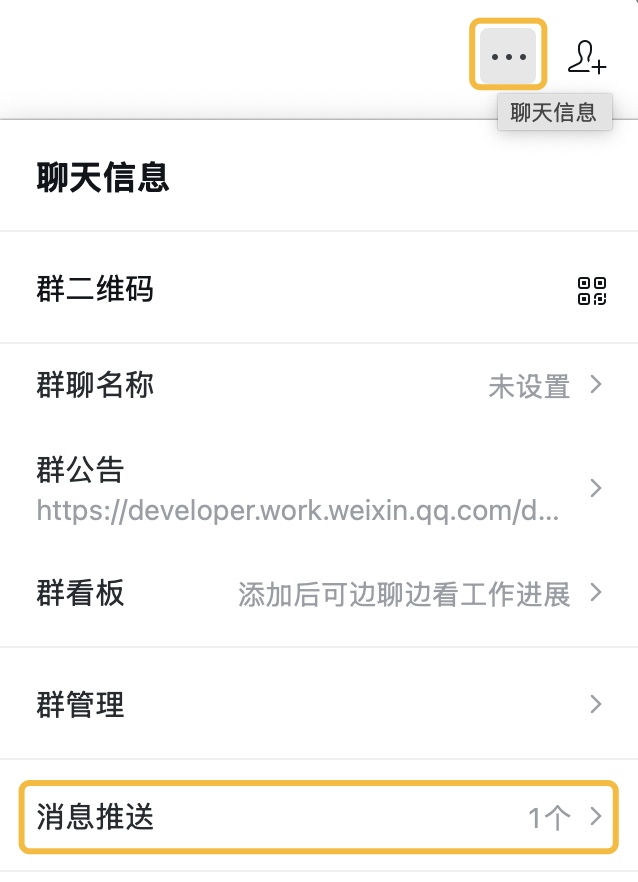
Get `WECOM_WEBHOOK_URL` following steps here, and envolve it as a bot into a group chat:
(Tip: You should get the `WECOM_WEBHOOK_URL` entirely as a URL, NOT just a KEY )
### STEP 1
### STEP 2
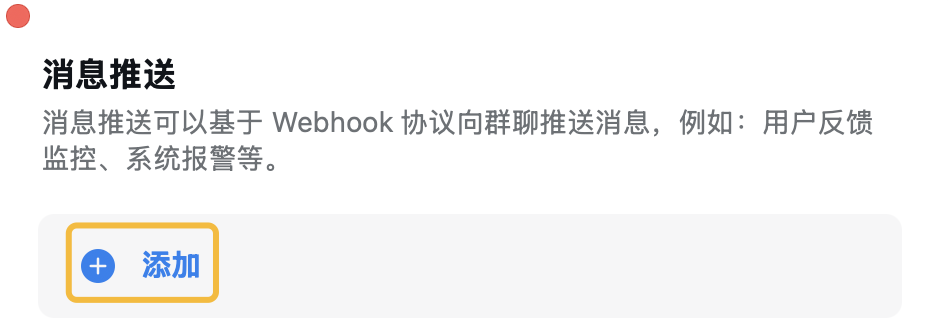
### STEP 3
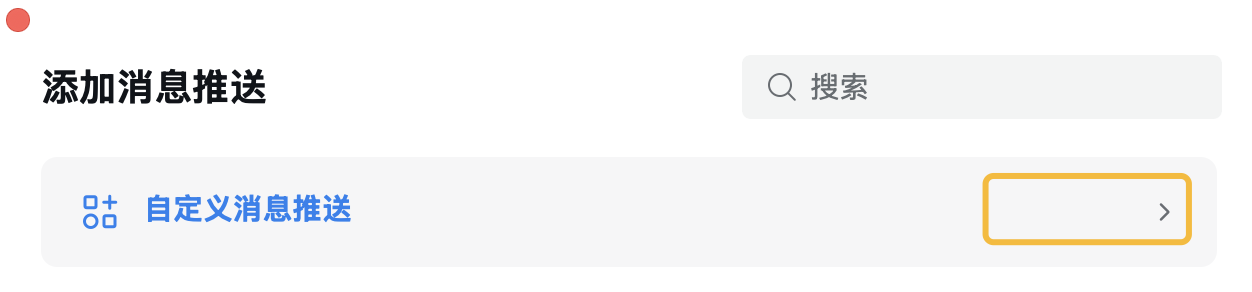
### STEP 4
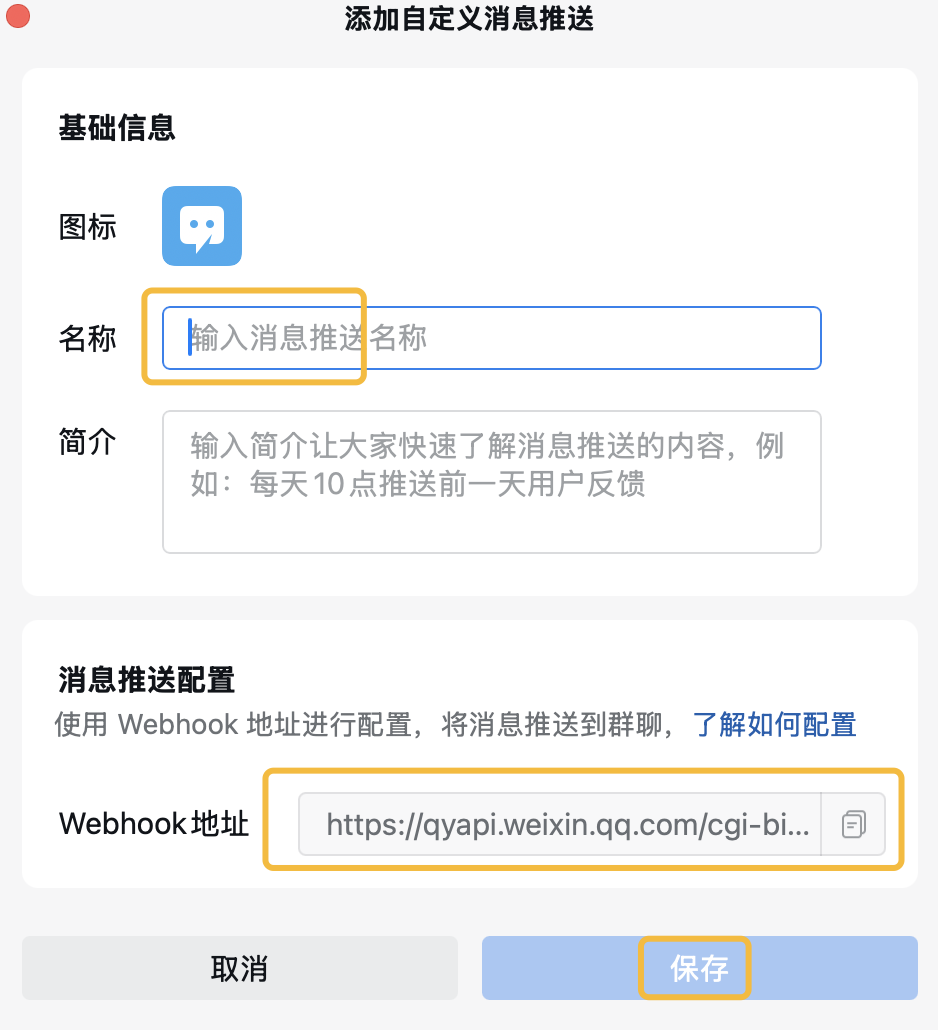
# Reference
[Message Receiving and Sending in a Group Chat](https://developer.work.weixin.qq.com/document/path/99110)
[Download WeCom Apps](https://work.weixin.qq.com/#indexDownload)
Security scan, version history, and community comments: view on ClawHub