Building Autonomous AI Agents: From Conversational AI to Task Execution
Learn how modern AI agents evolved from rigid chatbots to autonomous systems with memory, tools, and reasoning capabilities for LLM applications.
TL;DR
- Modern AI agents combine LLM reasoning with persistent memory and tool execution
- Three core layers: perception (NLP), cognition (reasoning/planning), action (tools/channels)
- Key capabilities: intent recognition, context retention, multi-turn conversations
- Implementation requires careful configuration of memory, safety guardrails, and channel integrations
- Production deployments need token management, secure tunnels, and scalable infrastructure
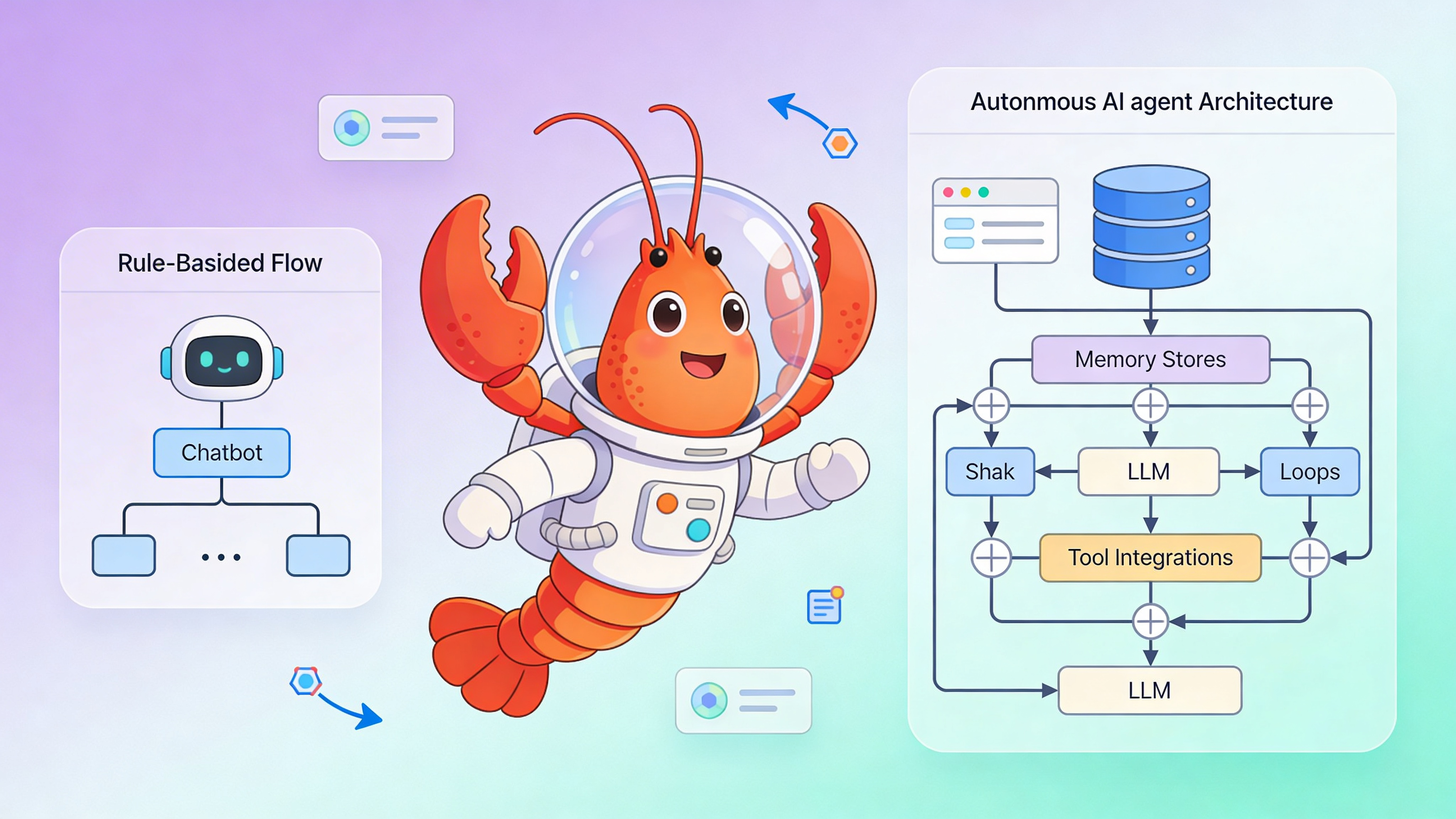
From Scripted Chatbots to Autonomous Agents
The earliest chatbots operated on decision trees and keyword matching. If a user deviated from expected phrasing, the system failed. Modern AI agents powered by LLMs understand semantic intent, maintain persistent memory across sessions, and execute complex workflows via tool integration. This shift from symbolic AI to neural reasoning enables agents that learn from conversation history and adapt their behavior without manual rule updates.
| Capability | Rule-Based Bot | LLM Agent | Implementation Notes |
|---|---|---|---|
| Intent Recognition | Exact keyword match | Semantic embeddings + LLM classification | Uses sentence-transformers |
| Context Memory | Session-limited (5-10 turns) | Persistent vector DB (unlimited) | Chroma, Pinecone, or pgvector |
| Tool Execution | Hardcoded API calls | Dynamic function calling | OpenAI Functions / JSON schema |
| Response Generation | Template strings | Context-aware NLG | Prompt engineering + temperature |
| Learning Method | Manual rule updates | In-contextRAG retrieval | No fine-tuning required |
| Multi-Channel | Single platform | Telegram, Discord, Slack integrations | OpenClaw supports multiple |
Core Architecture: Perception, Cognition, Action
OpenClaw agents operate on a three-layer architecture. Perception handles input parsing and intent extraction. Cognition manages reasoning, planning, and memory retrieval. Action executes tools and generates channel-specific responses. Each layer runs independently, allowing developers to swap LLM providers, vector stores, or messaging platforms without refactoring the entire system.
Local Setup and Configuration
Start OpenClaw locally with Docker Compose. Clone the repository, configure your gateway token, and launch the stack.
git clone https://github.com/openclaw/openclaw.git
cd openclaw
cp .env.example .env
# Edit OPENCLAW_GATEWAY_TOKEN in .env before proceeding
docker-compose up -d
# Verify agent UI at http://localhost:18789
# Check logs: docker logs -f openclaw-gateway
Agent Configuration
Configure memory, channels, and tools in config.yaml. This example shows a production-ready setup with ChromaDB for memory, Telegram integration, and a custom user lookup tool.
# OpenClaw agent configuration
agent:
  name: "support-agent"
  persona: "You are a helpful technical support assistant. Keep responses concise and accurate."
  max_tokens: 4096
  temperature: 0.3

memory:
  provider: "chromadb"
  collection: "conversation_history"
  embedding_model: "sentence-transformers/all-MiniLM-L6-v2"
  retention_days: 30
  similarity_threshold: 0.75

channels:
  telegram:
    enabled: true
    token: "${TELEGRAM_TOKEN}"  # Load from environment, never commit
    webhook_url: "https://user-123.easyclawd.com/webhook/telegram"
    max_message_length: 2000
    rate_limit: 10  # messages per minute per user
  discord:
    enabled: false  # Coming soon in OpenClaw v2.1

safety:
  max_conversation_turns: 50
  block_patterns:
    - "password|ssn|credit card|api_key"
  allowed_domains:
    - "api.yourcompany.com"
  require_confirmation_for_tools: true

tools:
  - name: "get_user_account"
    description: "Fetch user account details by email from internal CRM"
    parameters:
      email:
        type: "string"
        required: true
        pattern: "^[\\w\\.+-]+@[\\w\\.-]+\\.[a-zA-Z]{2,}$"
    endpoint: "http://internal-api:8080/users"
    method: "GET"
    auth_token: "${API_TOKEN}"
    timeout: 5
    retry_attempts: 2

observability:
  logging_level: "INFO"
  capture_tool_invocations: true
  anonymize_user_data: true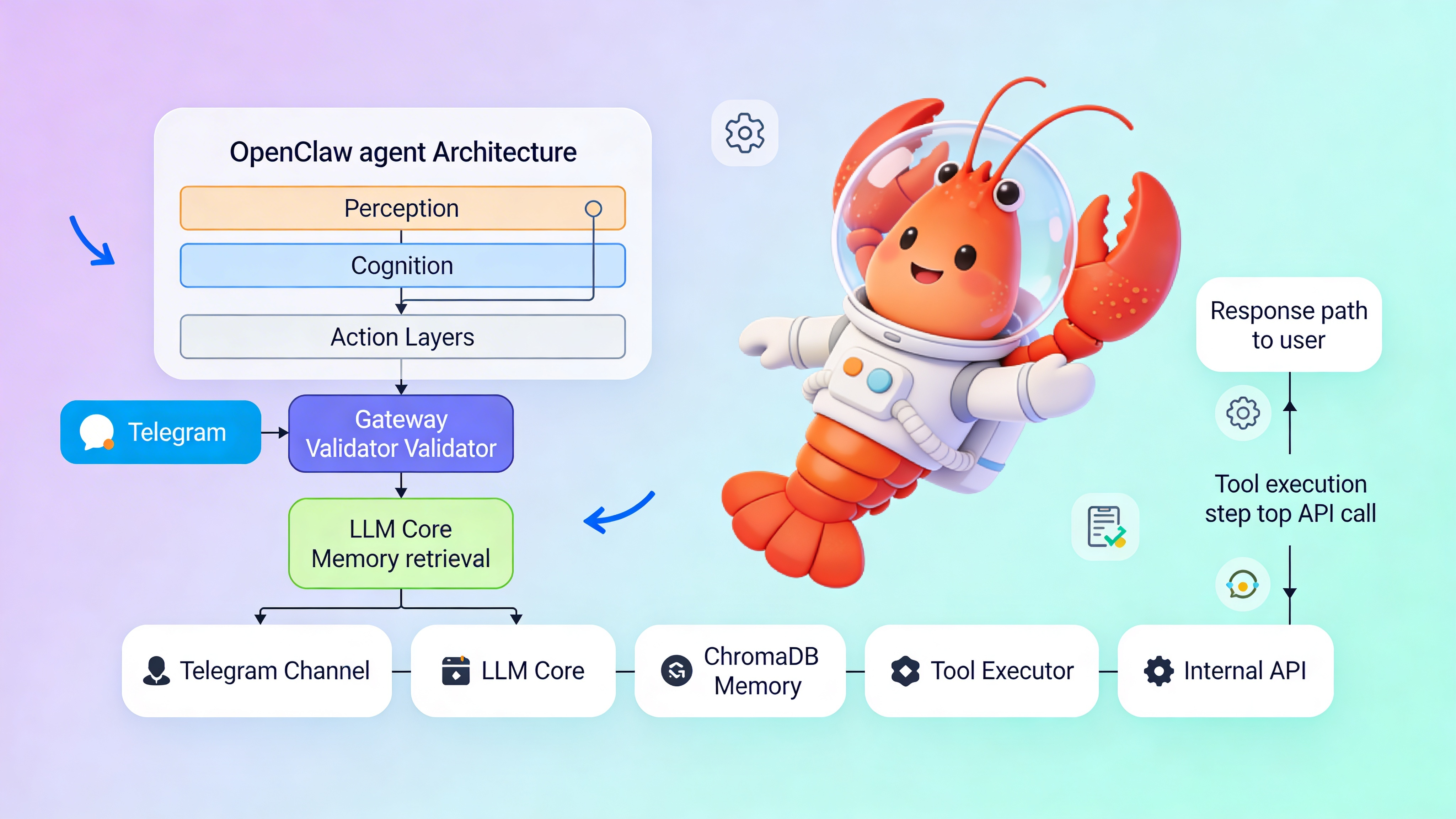
⚠️ Warning: Exposing your OPENCLAW_GATEWAY_TOKEN in logs or version control grants full agent access. Compromised tokens allow attackers to impersonate users and invoke tools. Use Docker secrets or environment variable injection. EasyClawd manages token rotation automatically via Cloudflare Tunnel, but self-hosted instances must implement manual key rotation policies and audit logging.
Memory Patterns for Persistent Context
Vector databases enable semantic memory that survives session restarts. Store user preferences, past interactions, and domain knowledge for retrieval-augmented generation. Use separate collections per tenant for multi-tenancy. Implement TTL policies to comply with GDPR. For high-traffic agents, partition collections by date and use approximate nearest neighbor search to reduce latency. Query memories before each LLM call to inject relevant context without exceeding token limits.
Tool Integration and Error Handling
Tools bridge LLM reasoning to external systems. Define JSON schemas for each tool with strict parameter validation. Implement idempotency for safe retries. Use circuit breakers when external APIs fail. Log all tool invocations with timestamps and user IDs for audit trails. Return tool errors back to the LLM so it can self-correct and inform the user gracefully. Never expose stack traces to end users—sanitize error messages through the safety layer.
See Also
- OpenClaw Core Documentation — https://github.com/openclaw/openclaw/wiki
- LLM Function Calling Best Practices — https://platform.openai.com/docs/guides/function-calling
- Vector Database Performance for RAG — https://www.pinecone.io/learn/vector-database-performance/
Ready to deploy your OpenClaw AI assistant?
Skip the complexity. Get your AI agent running in minutes with EasyClawd.
Deploy Your AI Agent